Application Compatibility Toolkit 5.0: Complete Informative Guide for IT Professionals

The Application Compatibility Toolkit 5.0 (ACT 5.0) is one of the most important tools Microsoft released to help organizations test, analyze, and fix application compatibility issues during Windows upgrades. Even years after its release, ACT 5.0 remains highly relevant in enterprise environments, legacy system management, and software migration planning.
When businesses move from older Windows versions to newer ones, application failures are one of the biggest risks. ACT 5.0 was designed specifically to reduce that risk by giving administrators deep insight into how applications behave, why they fail, and how to resolve those issues efficiently.
What Is Application Compatibility Toolkit 5.0?
Application Compatibility Toolkit 5.0 is a Microsoft-provided framework used to identify, diagnose, and mitigate compatibility issues that occur when applications run on newer versions of Windows. It was primarily used during migrations to Windows Vista, Windows 7, and later enterprise upgrades.
At its core, ACT 5.0 helps answer critical questions:
-
Will my applications work on a new Windows version?
-
If not, why do they fail?
-
Can they be fixed without rewriting code?
ACT 5.0 provides tools that monitor application behavior, compare it against known compatibility data, and apply compatibility fixes (shims) where needed.
Instead of guessing or manually testing every application, IT teams could rely on data-driven analysis, saving both time and cost.
Key Components of Application Compatibility Toolkit 5.0
ACT 5.0 is not a single tool—it’s a suite of integrated components, each designed for a specific compatibility task.
The most important components include:
-
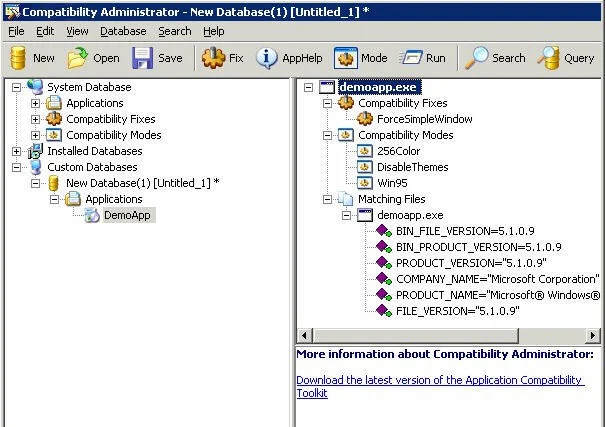
Compatibility Administrator
Used to create, edit, and deploy compatibility fixes (shims) that alter how applications interact with Windows. -
Standard User Analyzer (SUA)
Identifies issues related to permissions, registry access, and file system restrictions. -
Application Verifier
Detects programming errors, memory leaks, and improper API usage. -
Inventory Collector
Gathers application and system data across an organization. -
ACT Database
Central repository that stores compatibility data and test results.
Together, these components provide a complete lifecycle approach to application compatibility management.
How Application Compatibility Toolkit 5.0 Works
The workflow of Application Compatibility Toolkit 5.0 is logical and systematic. It follows a structured process that minimizes risk during OS upgrades.
The typical process includes:
-
Inventory Collection – Identify installed applications across systems
-
Compatibility Evaluation – Compare applications against known compatibility data
-
Issue Detection – Identify crashes, permission errors, or deprecated APIs
-
Shim Creation – Apply compatibility fixes without modifying application code
-
Deployment – Roll out fixes enterprise-wide
One of ACT’s biggest strengths is its ability to apply shims, which are small compatibility layers that intercept system calls and redirect them safely. This allows older applications to run on newer Windows versions without rewriting the software.
Why Application Compatibility Toolkit 5.0 Was Critical for Enterprises
For enterprises managing hundreds or thousands of legacy applications, ACT 5.0 was a game-changer. Before ACT, organizations often delayed OS upgrades due to fear of application failure.
ACT 5.0 solved several major problems:
-
Reduced migration risk
-
Lowered application remediation costs
-
Eliminated unnecessary application rewrites
-
Improved upgrade confidence
-
Centralized compatibility management
Many businesses were able to extend the life of critical legacy applications using ACT 5.0, allowing smoother transitions to newer Windows environments.
Even today, organizations maintaining legacy systems still reference ACT methodologies when planning upgrades.
Application Compatibility Toolkit 5.0 vs Modern Compatibility Tools
Although ACT 5.0 is now deprecated, its core concepts remain deeply embedded in modern Microsoft tools.
Modern alternatives include:
-
Windows Compatibility Troubleshooter
-
Microsoft Endpoint Manager
-
Windows Analytics (Desktop Analytics)
-
Application Compatibility Framework (ACF)
However, ACT 5.0 still stands out for:
-
Deep technical insight
-
Manual control over shims
-
Detailed logging and analysis
-
Offline compatibility testing
For learning purposes, legacy support, or understanding Windows compatibility architecture, ACT 5.0 remains highly educational and relevant.
Common Use Cases for Application Compatibility Toolkit 5.0
ACT 5.0 was commonly used in scenarios such as:
-
Migrating from Windows XP to Windows Vista/7
-
Supporting custom enterprise applications
-
Diagnosing permission-related crashes
-
Fixing legacy software without source code
-
Testing software before mass deployment
Even today, IT professionals studying Windows internals, enterprise migration, or backward compatibility frequently reference ACT documentation and tools.
Conclusion
Application Compatibility Toolkit 5.0 played a pivotal role in shaping how enterprises manage software compatibility. By combining analysis, automation, and compatibility fixes, it allowed organizations to modernize their systems without sacrificing critical applications.
While newer tools have replaced it, the principles, architecture, and methodologies of ACT 5.0 remain foundational in Windows compatibility engineering. Understanding ACT 5.0 is not just about legacy support—it’s about understanding how Windows achieves backward compatibility at scale.
FAQs
1. Is Application Compatibility Toolkit 5.0 still supported?
No, it has been deprecated, but its concepts are still used in modern tools.
2. What are shims in ACT 5.0?
Shims are compatibility layers that redirect system calls to prevent application failures.
3. Can ACT 5.0 modify application code?
No, it works without altering the original application code.
4. Who should learn ACT 5.0 today?
IT professionals, system administrators, and students of enterprise Windows systems.
5. Is ACT 5.0 useful for modern Windows versions?
Not directly, but its concepts are still relevant for understanding compatibility frameworks.